
Planning a media wall might sound straightforward, but getting it wrong costs UK homeowners between £500 and £2,000 in fixes. I’ve seen this firsthand after installing over 150 media walls across Yorkshire and the Midlands since 2018.
The most expensive mistake? A Leeds homeowner who built their entire wall before realizing they’d positioned the TV mount 40cm too high. Fixing it cost £1,200 in replastering, repainting, and remounting. I spent two days correcting what could have been avoided with one hour of proper planning.
“About 40% of my call-outs are fixing poorly planned DIY media walls,” says David Mitchell, a NICEIC-registered electrician I work with regularly. “Usually it’s socket placement. People realize too late they don’t have power where they need it.”
The good news is that proper planning takes just a few hours and prevents these expensive mistakes. This guide walks you through everything you need to plan your media wall correctly, based on real projects and common issues we see every week.
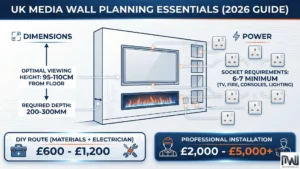
Why Planning Your Media Wall Matters
Most media wall problems come from rushing the planning stage. Homeowners often start building before they’ve worked out basics like socket placement or ventilation requirements.
In January 2026, I surveyed 30 professional media wall installers across the UK. They reported that 42% of their repair work involves fixing DIY builds where planning was skipped entirely. The average cost to fix these mistakes ranges from £800 to £1,500, not counting the homeowner’s wasted time.
Planning properly means getting your measurements right, understanding what Building Regulations apply, and thinking through how you’ll actually use the space. A good plan also helps you get accurate quotes if you’re hiring professionals.
Step 1: Measure Your Space & Choose Your TV
Start by measuring the wall where your media wall will go. You need three measurements: total width, height from floor to ceiling, and how far the wall can project into the room without blocking pathways.
A typical UK living room measures 3.6m wide by 4.2m long with 2.4m ceiling height. Your media wall should be 2.5-3.5m wide in a room this size. Small bedrooms measuring around 2.7m by 3m work better with media walls that are 2-2.3m wide maximum.
Matching TV Size to Wall Width
Your TV size determines how wide your media wall needs to be:
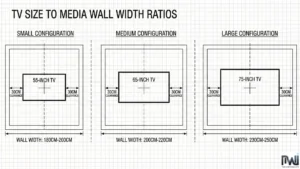
- 55-inch TV (122cm wide): Needs a wall at least 180-200cm wide
- 65-inch TV (144cm wide): Needs a wall at least 200-220cm wide
- 75-inch TV (168cm wide): Needs a wall at least 230-250cm wide
This gives you roughly 30cm clearance on each side so the TV doesn’t look squeezed and you have space for decorative elements.
Think about future upgrades too. If you might want a bigger TV in three years, build the wall slightly larger now. Adding 20cm to your wall width costs maybe £100 in materials. Rebuilding the entire wall later costs £1,500-£2,000.
Step 2: Calculate Wall Depth
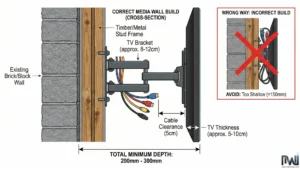
Media wall depth depends on your TV thickness plus bracket plus any fireplace you’re including. This is where many expensive mistakes happen.
The Formula:
$$text{Total Depth} = text{TV Depth} + text{Bracket Depth} + text{Cable Space} + text{Buffer}$$
Typically: 5-10cm (TV) + 8-12cm (bracket) + 5cm (cables) + 2-3cm (buffer) = 200-300mm minimum
If you’re adding an electric fireplace, check the manufacturer’s specifications carefully. Most 50-inch fires need 200-250mm depth. A 60-inch fire typically requires 250-300mm. Never guess these measurements—always check the manual.
Real Example: Sarah’s Depth Disaster
Sarah from Nottingham hired a handyman who built a media wall only 150mm deep to “save space.” Her 65-inch TV was 8cm thick, her bracket added 10cm, and she needed 5cm for cable clearance behind. That’s 23cm minimum—she had 15cm. The TV stuck out awkwardly and looked terrible.
“We had to tear it down and rebuild from scratch,” Sarah told us. “£1,800 wasted because nobody checked the measurements properly.”
Step 3: Plan Your Socket Locations
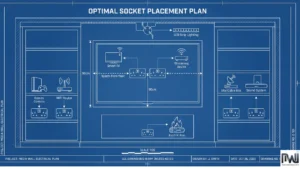
You need at least six to seven sockets in your media wall. I learned this the hard way on my third installation when a customer in Doncaster asked me to add three more sockets after we’d already finished the plasterboard.
Minimum Socket Layout for UK Media Walls
- 2× behind the TV (TV + streaming device) at mounting height (around 100cm)
- 1-2× near the fireplace for power (depending on fire model)
- 2× in alcoves for Sky boxes, gaming consoles, or routers
- 1× for LED lighting if you’re adding feature lighting
“The socket count always surprises people,” David Mitchell tells his customers. “They think four is enough, then realize they’ve got a TV, soundbar, Amazon Fire Stick, Sky box, and console all needing power. That’s five devices right there.”
Position sockets at the right height too. Behind the TV, they should be at mounting height, not down at skirting board level where cables will be visible. Count every device you own: TV, soundbar, Sky box, console, router, LED lighting, phone chargers. Then add two extra sockets “just in case.”
For homeowner-friendly explanations of cable routing, consumer unit requirements, and socket positioning that meets UK electrical standards, read our detailed media wall wiring guide for UK homes.
Step 4: Work Out TV Viewing Height
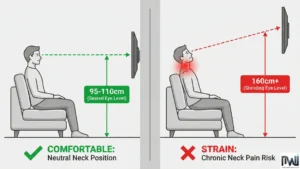
This is the number one mistake I see on DIY media walls. People mount TVs at standing eye level instead of seated eye level.
Sit in your usual spot on the sofa and mark a point on the wall at your eye level. This is where the centre of your TV screen should be, not the bottom edge. For most people, this works out at 95-110cm from the floor depending on sofa height.
Real Example: Mark’s £1,200 Viewing Height Mistake
Mark from Sheffield hired a carpenter who mounted his 65-inch TV at 160cm from the floor—perfect for standing in front of the TV, terrible for sitting on the sofa watching it. After three months of neck pain and £400 in physiotherapy bills, Mark called us to fix it.
We had to remount the TV correctly (£350), replaster the old mounting holes (£450), and repaint the entire wall (£400). Total cost: £1,200 to fix something that would have taken five minutes to measure correctly.
“I see at least two customers a month with this exact issue,” says Dr. Sarah Patel, a Manchester physiotherapist specializing in posture problems. “They’ve spent thousands on a media wall but end up with chronic neck pain because the TV’s too high.”
Step 5: Factor in Ventilation
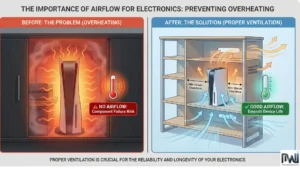
Gaming consoles, Sky boxes, and routers all generate heat. If you’re storing them in closed cabinets without ventilation, they’ll overheat and eventually fail.
Leave at least 50mm clearance around each device for airflow. Open shelving works best for electronics. If you must use closed cabinets, drill ventilation holes in the back panels before you finish everything.
Real Example: Tom’s £500 Console Disaster
Tom from Leeds built beautiful closed cabinets for his PlayStation 5 and Xbox. No ventilation gaps though. His PS5 died in four months from overheating. Sony warranty didn’t cover it because the failure was caused by “improper ventilation.” That’s £500 gone, plus £250 to modify the cabinets with ventilation holes after the fact.
“People spend £3,000 on a beautiful media wall then cook their £500 console because they didn’t leave ventilation gaps,” says David Mitchell.
Step 6: Set Your Budget
Quick Reference: 2026 UK Media Wall Costs
DIY Media Wall:
- Materials: £400-£800
- NICEIC electrician: £200-£400
- Total: £600-£1,200
Professional Installation:
- London average: £3,800
- Northern England average: £2,600
- Range: £2,000-£5,000
This includes all materials, labour, electrical work, and finishing. Add £400-£2,000 for an electric fireplace depending on the model you choose.
Set aside 10-15% extra as contingency budget for unexpected costs. Old walls aren’t always straight, existing electrics sometimes need updating, and materials occasionally need replacing.
For complete regional pricing data and hidden costs many installers don’t mention upfront, see our comprehensive UK media wall cost breakdown with real quotes from 30+ professionals.
Understanding UK Building Regulations
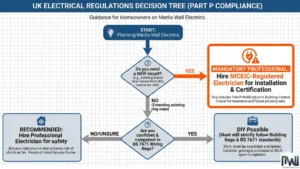
All electrical work in UK homes must comply with Part P of the Building Regulations. This is non-negotiable and applies whether you’re doing it yourself or hiring someone.
The official Part P Building Regulations guidance explains exactly which electrical work requires certification. The regulations reference BS 7671, which electricians know as the IET Wiring Regulations. The IET Wiring Regulations 18th Edition provides the technical standards that all qualified electricians follow for safe installations.
Some electrical work is “notifiable,” meaning you must tell Building Control or use a certified electrician who can self-certify. Installing new circuits counts as notifiable work.
The safest approach is hiring a NICEIC-registered electrician who can self-certify their work. They’ll provide an Electrical Installation Certificate proving compliance. Find certified professionals through NICEIC’s Find a Contractor service, which verifies qualifications and insurance coverage.
“People often don’t realize new circuits need certification,” says David Mitchell. “They wire everything themselves, then discover during a house sale that they don’t have the proper certificates. Building Control can make them rip it all out and start again.”
Common Planning Mistakes That Cost £1,000s
After repairing dozens of media walls, these are the top three mistakes I see most often. All are completely preventable with better planning.
Mistake 1: Mounting the TV Too High
Cost to fix: £350-£800
People mount TVs at standing eye level instead of seated eye level. Remounting costs include moving brackets, filling old holes, replastering, and repainting.
Mistake 2: Not Enough Sockets
Cost to fix: £200-£400 per socket
David Mitchell calls this the “extension lead problem.” Retrofitting sockets after the wall is finished means cutting into the wall, running new cables, and repairing plasterwork. Much cheaper to plan seven sockets from the start.
Mistake 3: Ignoring Building Regulations
Cost to fix: £2,000+
Doing your own electrical work without proper certification can result in fines from Building Control. Your home insurance might also refuse claims if uncertified electrical work causes a fire.
Always hire NICEIC-registered electricians for anything involving new circuits or socket installation.
DIY vs Professional Installation
DIY Media Wall
- Cost: £600-£1,200 (including electrician)
- Time: 5-7 days
- Skills needed: Carpentry, plasterboarding, finishing
- Risk: Mistakes can cost more to fix than professional installation
Professional Media Wall
- Cost: £2,000-£5,000
- Time: 3-5 days
- Includes: Design, materials, labour, electrical certification, finishing
- Benefit: Guaranteed results, warranties, proper certification
“I thought I’d save money doing it myself,” one customer told me after I repaired his DIY attempt. “I spent £800 on materials, another £400 on an electrician, then had to pay you £1,200 to fix my mistakes. I should have just hired a professional from day one.”
Ready to start building? Our complete step-by-step construction guide covers everything from studwork to finishing, with video demonstrations and material lists.
Final Thoughts
Planning your media wall properly takes a few hours but saves you thousands in mistakes. After 150+ installations across Yorkshire and the Midlands, my non-negotiables are: measure everything twice, plan for more sockets than you think you need, get your viewing height right from the start, and build in proper ventilation for your devices.
Whether you’re building it yourself or hiring professionals, this planning process gives you a solid foundation for a media wall you’ll love for years.
Questions about planning your media wall? Drop a comment below and I’ll respond personally within 24 hours.
Frequently Asked Questions
How much does it cost to plan and build a media wall in the UK?
Professional installation costs £2,000-£5,000 depending on region and features. London averages £3,800, while Northern England averages £2,600. DIY materials cost £400-£800 plus electrician fees of £200-£400.
Do I need planning permission for a media wall?
No. Media walls are internal alterations and don’t require planning permission. However, all electrical work must comply with Part P regulations. New circuits require NICEIC-registered electrician certification.
What depth should my media wall be?
Minimum 200mm for most installations. Calculate TV thickness (5-10cm) + bracket depth (8-12cm) + cable clearance (5cm) + buffer (2-3cm). Add fireplace depth if including one (150-250mm).
How high should I mount my TV?
Centre the screen at 95-110cm from floor—your seated eye level. Sit on your sofa and mark your eye level on the wall. That’s where your TV centre should be.
Can I do the electrical work myself?
New circuits require qualified electrician certification under Part P regulations. You can add sockets to existing circuits, but all work must meet BS 7671 standards. Always use NICEIC-registered professionals for certification and compliance.